A vortex script to select a set number of compounds at random from a workspace, keeping only molecules whose molecular weight and LogP fall within limits the user sets.
Why use it
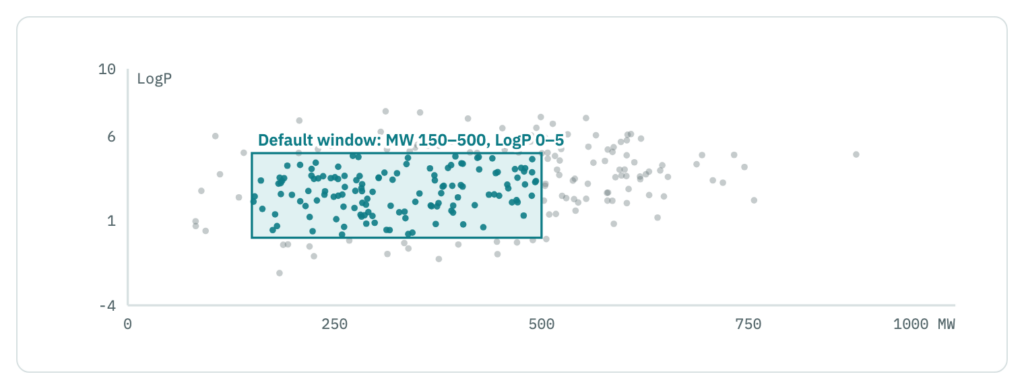
A simple random selection of a large collection, such as a ChEMBL download, picks up compounds you would rarely want in a sample: large peptides and natural products with very high molecular weight, and molecules with extreme LogP. This script makes the random draw only from the rows that sit inside a property window, so every compound it picks is drug-like by the limits you choose.
You can also tick Ignore properties to get the original behaviour: a random selection from the whole workspace.
The dialog
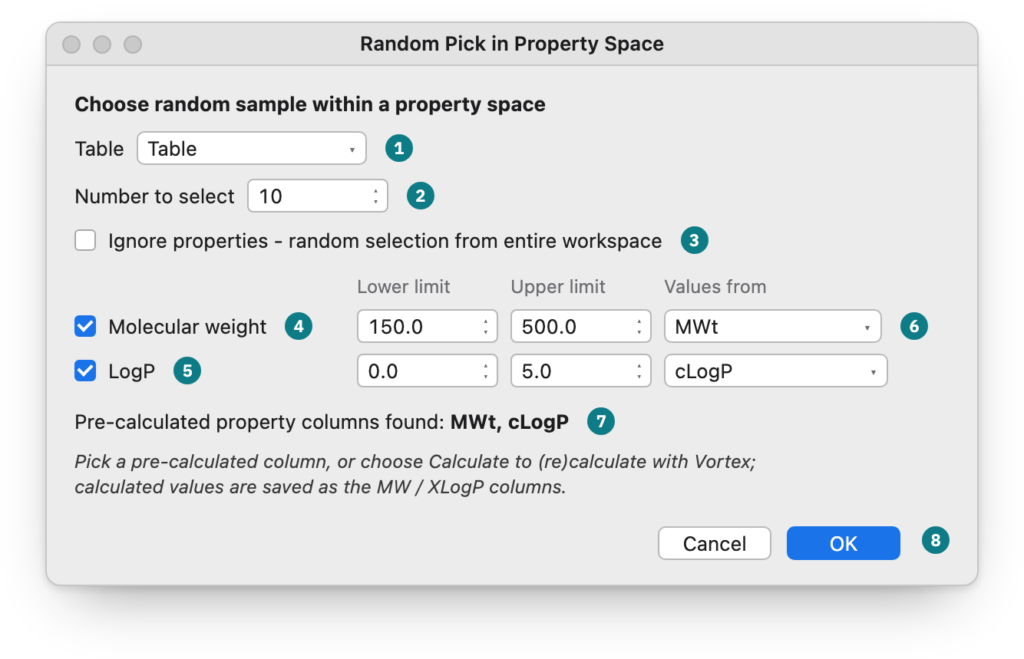
Run the script MakeRandomSelectionPropertySpace.vpy with a workspace open. This dialog appears. The numbers match the table below it.
| OPTION | DEFAULT | |
|---|---|---|
| 1 | Table Shown only when the workspace has more than one table. Choosing a table refreshes the column lists. | current |
| 2 | Number to select How many rows to pick at random. | 10 |
| 3 | Ignore properties Skips the window and picks from every row. Greys out the property controls; nothing is read or calculated. | off |
| 4 | Molecular weight Tick to filter on MW. Rows must be within the lower and upper limits, inclusive. | 150 – 500 |
| 5 | LogP Tick to filter on LogP, inclusive limits. Untick either row to filter on the other property only. | 0 – 5 |
| 6 | Values from Where each property comes from: an existing column, or a Calculate option that works it out with Vortex’s own calculator. | best match |
| 7 | Columns found Lists the property columns the script recognised in the table. | |
| 8 | OK Starts the job with a progress bar you can cancel. |
Choosing where values come from
Each Values from list is built from the table’s columns, in this order:
- Columns whose title looks like the property, best match first. The top one is preselected.
- The Calculate option for that property.
- Every other numeric column, in case your column has an unusual name.
If no matching column is found, Calculate is preselected.
Recognised titles
Case, spaces and punctuation are ignored, so mol. wt. matches the same as MolWt.
MOLECULAR WEIGHT
MW, MW., MWt, Mwt, MolWt, mol. wt., Mol Weight, molecular weight
LOGP (ANY TITLE CONTAINING “LOGP”)
XLogP, cLogP, ClogP, LogP, logp, calc LogP, AlogP, MlogP, eLogP, SlogP
LogD columns are not matched.
Calculating instead
Choose Calculate MW (Vortex) or Calculate XLogP (Vortex) to work the property out with Vortex’s built-in calculator, even when a column already exists. The results are saved to columns named MW and XLogP. Next time you run the script those columns are recognised and preselected, so the calculation is not repeated.
What happens when you click OK
- Check the limits. If a lower limit is above its upper limit, or both properties are unticked without Ignore properties, you get a message and nothing runs.
- Get the property values. For each ticked property the script reads the chosen column, or calculates the values in blocks of 20,000 structures. The progress bar shows how far it has got and an estimate of time left.
- Save calculated values. Calculated properties are written to the
MWandXLogPcolumns. - Find rows in the window. A row qualifies when every ticked property has a value within its limits. Rows with no structure, a failed calculation or a blank cell are left out.
- Draw at random. The script picks the requested number of rows from the qualifying ones, clears your current selection and selects the picks.
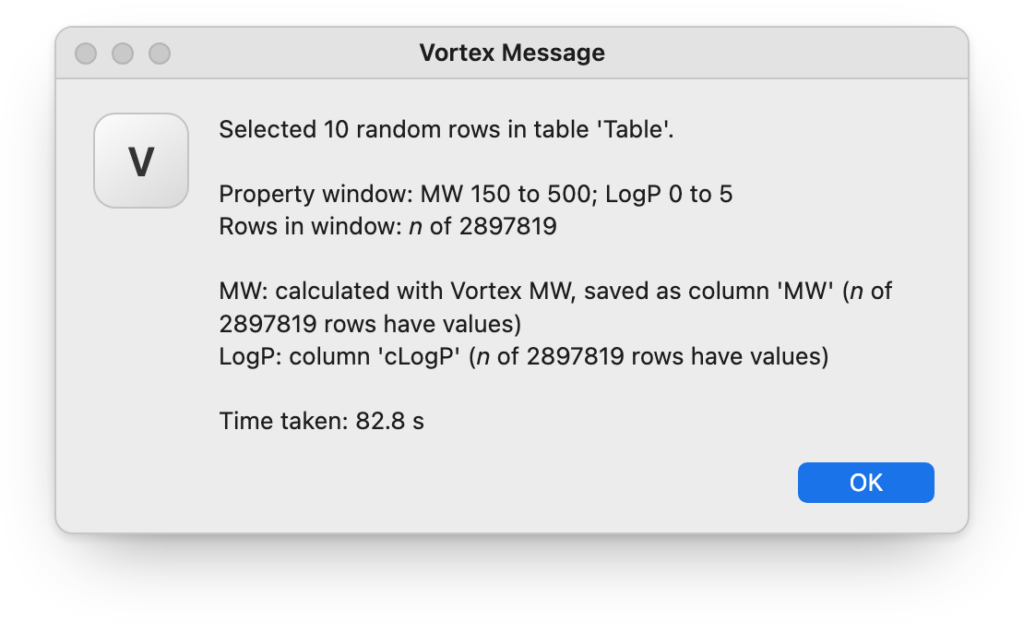
- Report. When the progress bar closes, a summary shows the window, how many rows qualified, where each property came from and how long it took.
Other messages
Too few rows in the window
You asked for more rows than qualify. The message gives both numbers. Widen the limits or ask for fewer; your selection is not changed.
Column has no numeric values
The column you picked is empty or holds text. Pick another column or choose Calculate.
Cancelled
You pressed Cancel on the progress bar. Values already saved stay in the table; the selection is not changed.
Lower limit above upper
Shown before anything runs. Correct the limits and run again.
Large workspaces
The script was tested on a ChEMBL workspace of 2,897,819 rows. Reading existing columns is quick. Calculating takes longer: in one run on that workspace, calculating MW took about 83 seconds in total.
Calculate once, then reuse. Vortex may pause for a few seconds while a calculated column is written back to the table. Because the values are saved as
MWandXLogP, later runs read the columns instead.
Installing
First download the Vortex script here.
Copy the script into your Vortex scripts folder. It appears in the Scripts menu straight away; no restart is needed.
Written for Vortex 26.05 (Jython 2.5). It uses only Vortex’s built-in calculator, so no external tools or Python environments are needed.